3. STIG Review Handling and Matching
STIG Manager treats STIGs as checklists broken out into hundreds of individual Rules. These Rules include Check Content elements that describe the actual check that must be performed to Evaluate the Rule.
Each Review for a Rule is tracked using a key created from the Check Contents and Version of the Rule being evaluated, independent of a specific STIG. This allows STIG Manager to track Reviews across STIG revisions as long as the Check Content has stayed the same.
When DISA Reference STIG releases are imported into STIG Manager, the Check Content is recorded for each Rule in that revision. When viewing Review workspaces, STIG Manager will present the Rules contained in the selected STIG Revision, and all the Reviews that are attached to those Rule’s specific keys.
This behavior lets a large proportion of Reviews that were performed with the previous STIG Revision to be presented when viewing the new STIG Revision. Reviewers will only need to perform Reviews on the Rules that have been added or where the actual Check they are performing has changed.
Note
- To be exactly technical, STIG Manager uses a combination of the following identifiers to track Reviews:
Rule “Version” (often called “STIG Id”)
The Rule’s check content, in the form of a unique SHA-256 digest of that Check Content.
3.1. Review Handling Comparison with STIG Viewer
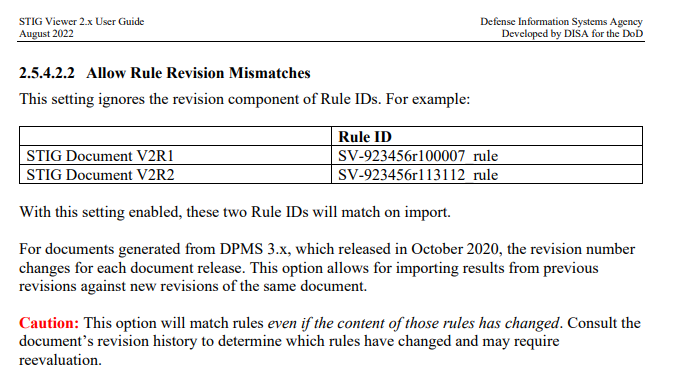
STIG Viewer can perform a similar function, matching the left-hand component of the RuleIds in older .ckl files and applying them to Rules in the current STIG. Our Sponsor and Users have rejected that approach because it applies Reviews to Rules even if the Check Content was changed. They have funded the more sophisticated approach taken by STIG Manager, that looks at whether or not the actual Check Content for a Rule has changed between Revisions.
The STIG Viewer User Guide cautions against using their matching feature too freely, and mentions the specific use case that STIG Manager addresses with its approach:
3.1.1. Rule Matching Example
STIG Viewer is limited because it operates only on the current set of STIGs, while STIG Manager has a history of older STIG Revisions. This means STIGMan can compare Rule Check Content between STIG and Rule changes, and only present Reviews that exactly match the Check Content of the Rule being evaluated.
Below is a screenshot of the STIGMan STIG Compare tool, showing a one-character difference between two related Rules from different STIG revisions. The STIG Viewer feature would apply the Review from the previous STIG revision to the new Rule, even though the Check Content has changed.
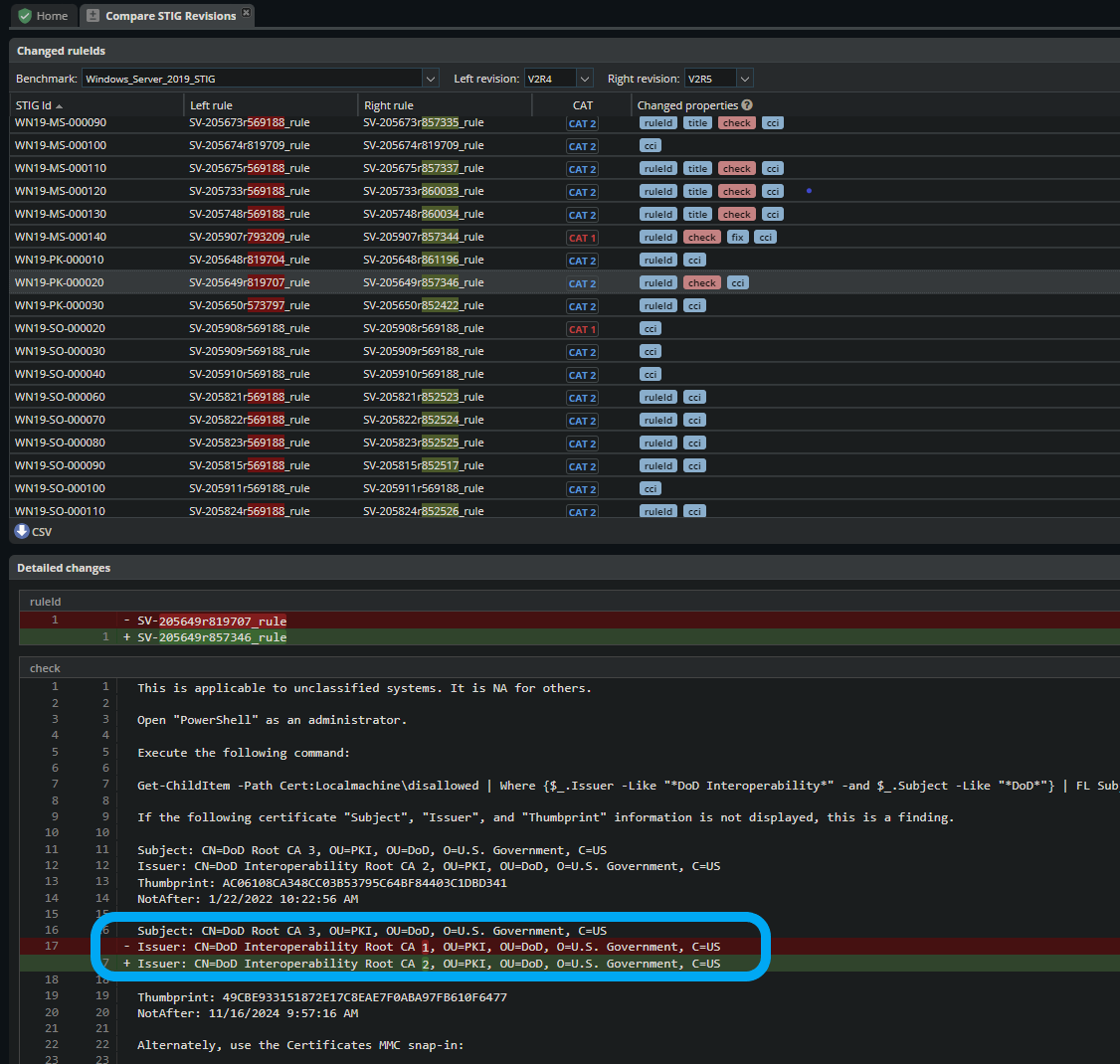
This is a small but significant change. Applying the previous Review as STIG Viewer would to the new version of the Rule would be a mistake, and could lead to a state where a system was using an invalid Certificate Authority.
By contrast, STIG Manager will not present the previous Review for this related Rule, because the Check Content has changed. The Reviewer or an automated tool will need to perform a new Review for this Rule, verifying that the correct CAs are being used.