6. STIG Manager API Data Representations and Permissions
6.1. Data Model
STIG Manager’s primary organizational structure is the Collection. A Collection can be created to mirror components of an RMF Package, requirements identified in a Security Assessment Plan, or an entirely different principle that may be more convenient, such as by an organization’s Lab or by Asset OS.
- Collections are composed of:
Assets
STIGs attached to those Assets
Reviews of the Rules that compose each attached STIG
User Grants providing access to some or all of the Assets/STIGs in that Collection
Reports providing Status and Findings information
Collections, Assets, and Reviews all support a JSON field called “metadata” for general use that can be used to enhance functionality and associate arbitrary data with those elements. The project is exploring best practices and uses for this feature. Clients that “play nice” with this field would be expected to preserve metadata already there unless they put it there, perhaps in a nested object with their client name as the Key.
6.1.1. “Checklists” - .ckl and XCCDF
Assets and the STIGs assigned to them are generally presented as Checklists, the lists of Rules and Checks that compose the assigned STIG, and the Reviews that satisfy those Rules. STIG Manager associates Reviews with specific Rules, independent of the STIGs that are assigned to Assets. This allows for different and more useful presentations of the data than when the Reviews are expressed in flat files, such as .ckl or XCCDF files.
It is important to note that STIG Manager does not retain the actual .ckl or XCCDF files that are imported into it in any way. The files are parsed for the information they contain, and that information is stored in the database. Manual edits via the UI and new imports all contribute to the current state of an Assets reviews as presented by the UI and API. NEW .ckl or XCCDF files are generated on demand reflecting the current state of a Collections Assets, STIGs, and reviews. This approach provides several advantages:
Reviews are associated with specific Rule IDs
Review attribution info, status, and metadata can be attached to each individual Review.
Checklists are generated using the Reference STIGs imported and maintained by the Application Manager. This alleviates issues with partial checklists, unauthorized overrides, etc.
6.1.1.1. Processing .ckl Files
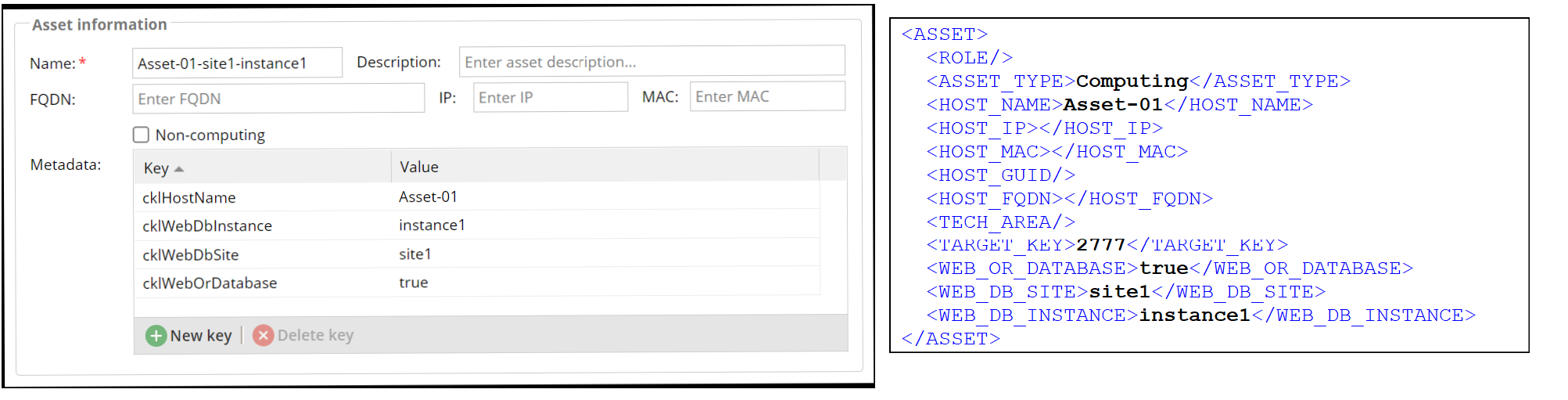
When the STIG Manager Client imports data from .ckl files, in the simplest case it will attempt to match (and, in some instances, create) the Asset specified in the .ckl’s <HOST_NAME> element. However, if the <ASSET><WEB_OR_DATABASE> element in the .ckl has a value of true, special processing is invoked. This processing will attempt to match the <HOST_NAME>, <WEB_DB_SITE> and <WEB_DB_INSTANCE> values in the .ckl with Asset metadata when identifying the Asset. When the STIG Manager Client creates Assets from .ckls with these elements populated, it will populate the same Asset metadata according to the table below.
Conversely, when STIG Manager produces a .ckl file from an Asset that has the below metadata values set, it will populate the appropriate .ckl elements.
The following metadata properties are used when the value of <ASSET><WEB_OR_DATABASE> is true:
|
Asset metadata |
Note |
|---|---|---|
|
|
When set to true, invokes additional processing using the below elements and metadata |
|
|
This value will populate the |
|
|
No specific purpose for STIG Manager, other than contributing to Asset identification |
|
|
No specific purpose for STIG Manager, other than contributing to Asset identification |
If the importer needs to create an Asset, it will set this metadata and set the initial Asset name to <HOST_NAME>-[<WEB_DB_SITE> | "NA"]-[<WEB_DB_INSTANCE> | "NA"]. The Asset name is not meaningful (to STIG Manager) and it can be changed by the user later, if required.
Note
See the Import Options section of this document for information about STIG Manager’s review import options.
6.1.1.2. Processing XCCDF Files
STIG Manager supports serializing Reviews in XCCDF format with a STIG Manager namespace (xmlns:sm="http://github.com/nuwcdivnpt/stig-manager"). Correct serialization was validated using the official NIST validation tool.
The XCCDF format is more expressive and extensible than the .ckl format, so additional data can be included. Not all tools will recognize elements making use of the STIG Manager namespace, but the files will still validate and test result information will be recognized. STIG Manager itself can re-import it’s own XCCDF files and will understand the STIGMan namespace fields.
STIGMan serializes elements containing data that are STIGMan specific, as well as other elements required to express test results and stay in accordance with the NIST XCCDF specification:
A STIGMan XCCDF file contains these elements and features:
<Benchmark><metadata>
<Benchmark><Group>and required children
<Benchmark><TestResult>and required childrenIdentifies STIG Manager as the test system
cpe:/a:nuwcdivnpt:stig-manager:[version]Serializes STIG Manager Asset properties and metadata as children of
<Benchmark><TestResult><target-facts>- Asset properties are described by<fact name="tag:stig-manager@users.noreply.github.com,2020:asset:[property]" `` - If an Asset metadata key begins with ``urn:, the fact name is equal to the metadata key - All other Asset metadata items are described by<fact name="tag:stig-manager@users.noreply.github.com,2020:asset:metadata:[key]"Serializes STIG Manager Review properties (detail, comment, resultEngine) as child elements under
<Benchmark><TestResult><rule-result><check><check-content>. Each child element is scoped to the STIG Manager namespace. The following elements are used:
sm:detail
sm:comment
sm:resultEngine
sm:type
sm:product
sm:version
sm:time
sm:checkContent
sm:location
sm:component
sm:overrides
sm:authority
sm:oldResult
sm:newResult
sm:remark
6.2. Permissions
6.2.1. Grants
Collection Access is controlled solely by the Grants that Collection Owners and Managers can delegate to other users. See the User definition for more info on these grants.
6.2.2. API Endpoints, Scopes, and Privilege Invocation
STIG Manager recognizes two “privileges” or “roles” that can be granted to users via configuration in the OIDC provider.
Users with the create_collection privilege can create new Collections of their own, but are otherwise ordinary users.
Users with the admin privilege must explicitly invoke the “elevate” parameter in queries to the API to make use of their privilege. In our reference UI, this parameter is sent when certain “Application Management” functions are invoked, such as requesting a list of all Collections, or creating a new Grant in a Collection they do not otherwise have access to.
These privileges must be present in the token presented to the API in order to be successfully invoked.
Access to specific endpoints is controlled by the scopes present in a user’s token. The scopes granted to users can also be configured in the OIDC provider.
See our Authentication and Identity documentation for more information about how these scopes and privileges interrelate.
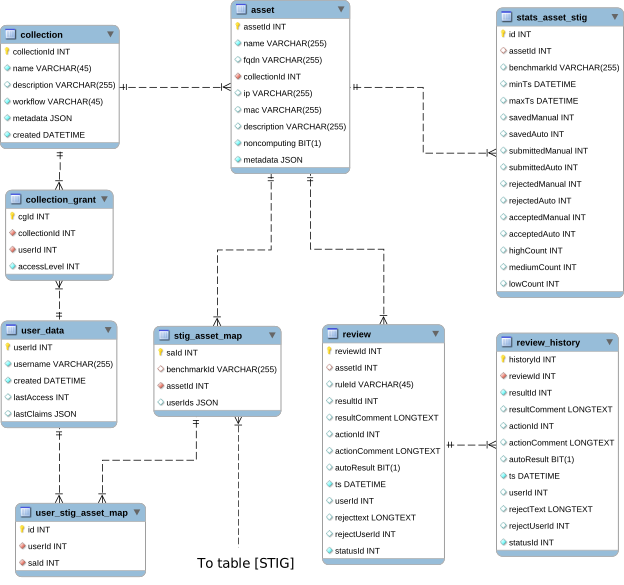
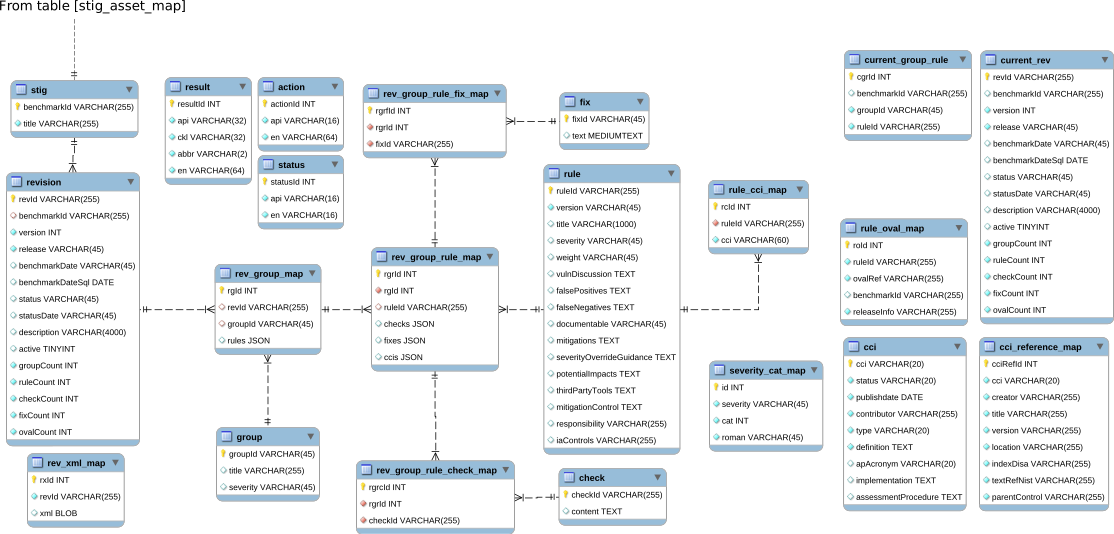
6.3. Database Entity Relationship Diagrams
These diagrams may not always be up to date. Always refer to the implemented db structure as the authoritative source for this information.